 NUILab Documents
Help / Start here / Your NUILab account — first sign-in
Start here
Your NUILab account — first sign-in
You received a lab username and temporary password. Here is what they unlock, how to sign in, and what to do next.
You (may) have received a direct message from Francisco on Mattermost with two things: a lab
username (it looks like f.lastname) and a temporary password. That is your NUILab
account — one login for the lab’s member services. This page walks you through your first
sign-in.
If you didn’t get a message but think you should have one, message Francisco on Mattermost (opens in new tab) , by email, or in person.
What this account unlocks
One login, several services (what you see depends on your role in the lab):
| Service | What it is |
|---|---|
| dashboard.nuilab.org (opens in new tab) | your app launcher — start here; it shows exactly the apps you have |
| files.nuilab.org (opens in new tab) | shared lab files (OpenCloud) |
| ihelp.nuilab.org (opens in new tab) | members-only documentation |
| systems.nuilab.org (opens in new tab) | lab infrastructure status (read-only) |
| git.nuilab.org (opens in new tab) | code hosting (Forgejo) — use Sign in with NUILab; see the Git guide |
| inventory.nuilab.org (opens in new tab) | equipment inventory |
(Mattermost chat is separate — you already have that account.)
First sign-in (2 minutes)
- Go to dashboard.nuilab.org (opens in new tab) .
- You’ll land on the lab sign-in page (
auth.nuilab.org). Enter your lab username (e.g.f.lastname) and the temporary password from the direct message. - That’s it — you’ll see your app launcher with the services available to you.
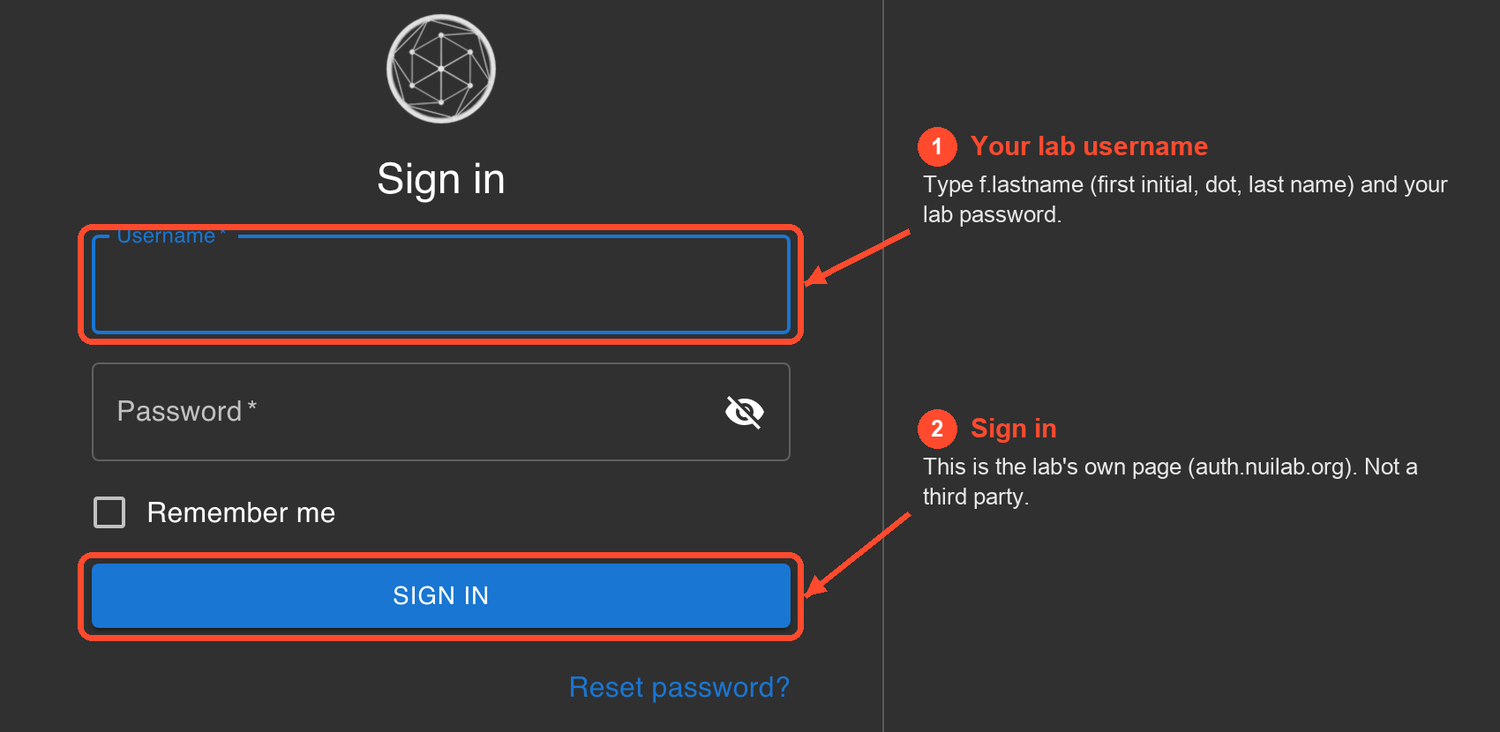
This same sign-in page (auth.nuilab.org) is how you reach most lab apps — being sent here is normal, not a third party.
Your session lasts several hours, and you can tick “Remember me” to stay signed in on your own device for 30 days.
Two-factor (optional, recommended)
Some services require a second factor; for the rest it’s optional but recommended. To enroll: sign in, visit auth.nuilab.org (opens in new tab) , open Methods, and register a One-Time Password app (or a passkey/security key). Enrollment sends a confirmation code to the email the lab has for you.
Changing your temporary password
Change it yourself at pwd.nuilab.org (opens in new tab) — sign in with your lab account, type a new password (at least 10 characters), done. It takes effect everywhere at once (web apps and SSH), and nobody but you ever sees it.
Two notes:
- The password page requires two-factor — if you haven’t enrolled a second factor yet, it will walk you through it first (an authenticator app; see the section above).
- Forgot your password entirely? Then you can’t sign in to change it — message Francisco on Mattermost (opens in new tab) for a reset.
Heads up: more lab services are being connected to this same account. If you skip setting up your sign-in, you won’t be able to reach some of them when they arrive.
Trouble?
- “User not found” / password rejected — double-check you’re using the lab username from
the DM (
f.lastname), not your Mattermost handle or email. Still stuck? Message Francisco. - Locked out or forgot the password — message Francisco for a reset.
Source: content/onboarding/lab-account.md · maintained in the lab docs repository.